I used to think AI garden design was just pretty pictures. Then I spent a weekend trying to turn my sad, patchy backyard into something that didn’t look like a lawn crime scene.
Two tools stood out: AI Garden Design (aigardendesign.io) and Ideal House Landscaping (ideal.house/create/landscaping). Both promise fast, photo-based concepts. Both deliver. But they solve slightly different problems.
Below is a hands-on, no-fluff comparison from someone who actually dragged a hose around while testing.
Why AI Garden Design Matters (Beyond the Hype)
Most homeowners don’t need a full landscape architect for the first idea pass. They need a cheap, fast way to see: “What if the lawn was smaller? What if there was a path here?”
That’s where AI Garden Design tools shine. They compress weeks of Pinterest scrolling and SketchUp fiddling into minutes. Industry tests in 2026 show that visual planning tools can cut early design time by 60–80% for small residential projects. The catch? Not all generators understand plants, climate, or real-world constraints.
Tool #1: AI Garden Design
What It’s Built For
This tool feels like it was made by people who’ve argued with a contractor about “just moving that tree a bit.”
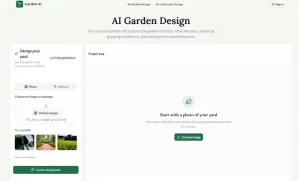
You upload one yard photo, mask the area to change, set style + climate inputs, and get a new concept that keeps your house and existing features intact. It’s less “make it look cool” and more “show me a buildable direction.”
How I Used It
I took a slightly crooked photo of my backyard, used the smart selection to mark the lawn and one flower bed, then picked cottage style, USDA zone 8b, full sun, and a slight slope. The generator returned three variants with before/after sliders that kept my house and fence in place.
The interface forces you to think in garden terms: style, hardiness zone, sunlight. That’s unusual. Most AI Garden Design apps just ask for a vibe.
Standout Features
AI Garden Design uses a garden-specific workflow: photo, area mask, conditions, then generate. It offers 18 garden styles from modern to Japanese to edible, all tuned for real landscapes. Climate-aware logic covers USDA zones 1a–13b, sun/shade, and slope, so plants and materials shift with location.
The before/after comparison keeps your original photo, so you can argue with your partner using evidence. Free users get three final generations before signing in.
Where It Stumbles
It’s concept-first, not construction-ready. You still need a pro for measurements and plant lists. The free tier is also limited for anonymous users.
Who It’s For
Homeowners testing curb appeal ideas, gardeners exploring bed layouts without killing existing trees, and landscape pros needing a fast visual conversation starter with clients will get the most value. In my test, this felt like the most “serious” AI garden design workflow. It didn’t try to be everything. It just did one job well.
Tool #2: Ideal House Landscaping
What It’s Built For
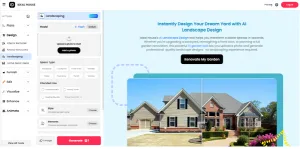
Ideal House treats your yard like another room in a home redesign project. Upload a photo, pick style + elements (firepit, deck, water feature), optionally add a reference image, and hit generate. It’s built for speed and visual variety.
Think: “I want to see 5 versions of my backyard with different vibes before I call anyone.”
How I Used It
I uploaded the same backyard photo, chose backyard as the space type, set the intended use to relaxation plus entertaining, and picked a modern Zen style with gravel and bamboo. Three options appeared in under a minute, and I downloaded my favorite.
The flow is simpler than AI Garden Design. Fewer climate inputs, more focus on style and features.
Standout Features
Ideal House is a photo-based AI landscape generator that works with front yards, backyards, patios, and balconies. You control garden style and specific elements like paths, shrubs, and water features.
It also hints at sustainable planning: low-maintenance layouts, drought-tolerant ideas, and eco-friendly options. Multiple versions per photo let you test modern, tropical, and minimalist on the same space.
Where It Stumbles
Climate logic is less explicit on the surface. It claims regional tailoring, but the inputs are lighter than AI Garden Design. It’s better for visual exploration than plant-specific planning, so you’ll still need a separate tool or pro for a detailed plant list.
Who It’s For
Homeowners who want quick curb-appeal concepts, designers testing multiple styles for client presentations, and urban dwellers with small patios or balconies will find this most useful. In my test, Ideal House felt like the “interior design app” of AI garden design tools. Fast, visual, great for brainstorming.
Side-by-Side: What’s Actually Different?
AI Garden Design focuses on buildable garden concepts from real photos, with explicit inputs for USDA zones, sun, and slope. Ideal House Landscaping focuses on fast visual variants for outdoor spaces, with lighter climate inputs and more emphasis on style and features.
For realism and site-aware concepts, AI Garden Design wins. For quick style exploration and “what if” scenarios, Ideal House is more playful. Both are legitimate AI garden design tools. They just optimize for different stages of the process.
What Worked (and What Didn’t) in Real Life
From “idea” to “first visual concept,” AI Garden Design took about 8 minutes including photo, mask, settings, and generate. Ideal House took about 5 minutes with photo, style, elements, and generate. Compared to my old method of Pinterest plus SketchUp plus arguing with myself, that’s a 70%+ time cut, which lines up with 2026 benchmarks for AI-assisted design workflows.
AI Garden Design kept my house, fence, and big tree intact, and the new planting felt plausible for zone 8b. Ideal House gave me prettier “magazine” versions, but one design added a deck that would absolutely violate my HOA rules. For serious planning, I leaned toward AI Garden Design. For “what if we went full tropical?” daydreams, Ideal House won.
Neither tool replaces a detailed plant list from a pro. But AI Garden Design’s climate inputs made the suggestions feel less random. Ideal House hinted at drought-tolerant and low-maintenance ideas, but I had to infer more from the visuals.
Which AI Garden Design Tool Should You Actually Use?
Use AI Garden Design if you want concepts that respect your actual site conditions, care about hardiness zones, sun, and slope, and are okay with “concept first, details later.”
Use Ideal House Landscaping if you want to quickly explore multiple styles and features, are designing for curb appeal or client presentations, and are fine with “visual direction first, plant logic later.”
Most people will benefit from using both: Ideal House for brainstorming, AI Garden Design for narrowing down to something buildable.
Final Thought: AI Garden Design Is a Starting Point, Not a Blueprint
After a weekend of testing, my takeaway is simple: AI garden design tools are fantastic for killing blank-page paralysis. They’re not fantastic for replacing a site visit, soil test, or a conversation with a local landscaper.
Use them to test ideas before spending money, align your household on a direction, and bring clearer visuals to a pro. Then let humans handle the part where roots meet dirt.