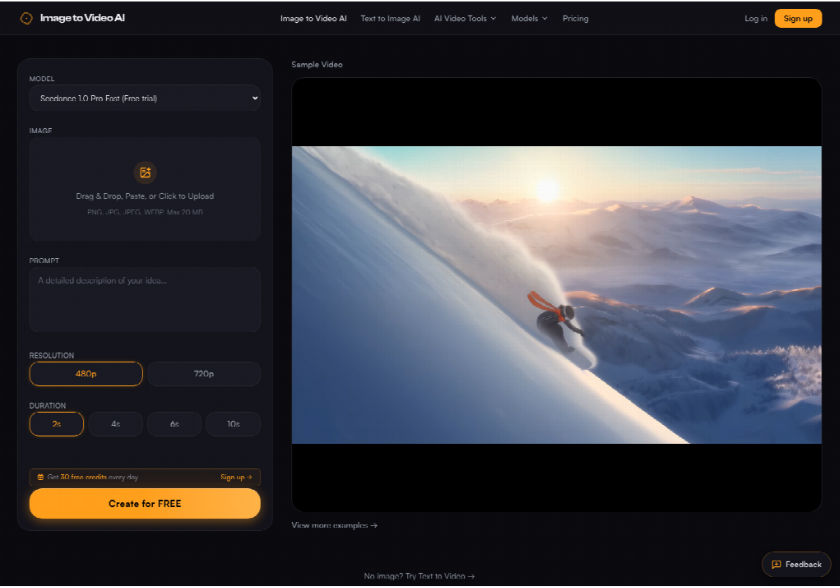
Earnings notes still ask a reader to imagine motion from a frozen chart. A short clip of that same still, built with image to video ai, supplies the second look without a new shoot.
The figure on a note gets swapped more often than the sentences around it. A coordinator who does not sign the filing still has to choose whether the graphic stays a still or becomes a short motion file. Image to Video AI is the panel for that second choice: one photo in, one prompt, and a clip that has to be checked against the figure the note already cites.
What A Frozen Chart Asks The Reader To Do
A still chart is doing a job a clip should not steal. The number, the unit, and the period have to stay readable in the graphic the note already cites. Motion helps only when it points at that same figure, the way a presenter points at a slide, and then gets out of the way.
Readers of a market note skim. A frozen chart asks them to supply the story themselves: revenue stepped up, a margin narrowed, a store count held. A short clip can carry a slow push toward the highlighted bar, but the bar's label has to remain the one in the original file. If the clip draws a different label, the note now has two figures, and the reader has no way to tell which one the filing used.
That is why the decision sits with the person who prepares the visual, not with the model menu. The still is the record. The clip is a second look scheduled after the number is locked. If the figure is still being revised for the call, there is nothing honest to animate yet.
Two Ways To Show The Same Figure
The practical compare stays inside one figure: leave the chart as a still, or run one short clip from that same file. Both can sit in the note. They do different jobs, and the table is the check before anyone spends a credit.
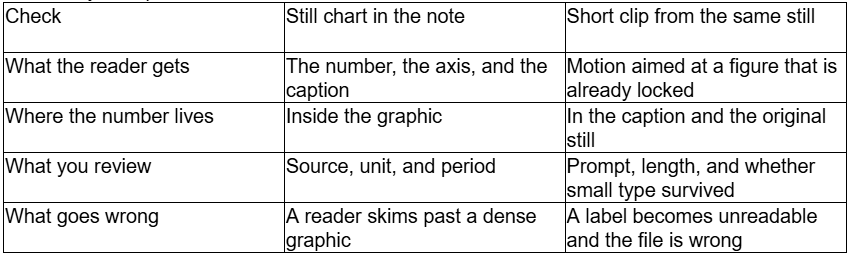
Read the table as a gate, not as a score. If the note's job is to defend a number, the still stays in the piece even when a clip is added. The clip does not become the citation.
Leave The Number In The Still
Keep the chart when the reader has to audit the figure. A still lets someone pause on a footnote, a unit, or a prior-year column without waiting for a camera move to finish. For a transcript recap or a takeaway list, that pause is the whole point. Nothing in the generator improves a number that was wrong in the source file.
The cost of staying with the still is attention. Dense charts get skipped on a phone. If the note only needs one bar to be noticed, a clip can point at it. The still still has to travel with the note, because that is where the number can be checked.
Add Motion Only After The Figure Locks
Add the clip when the figure will not change again before publish. Upload that locked still, write a prompt that names the move and nothing else, and treat the result as a pointer. A useful prompt is short: a slow push toward the highlighted bar, the rest of the chart holding still. A prompt that asks for a new total, a new year, or a cleaner axis is asking the model to redraw the record.
Then compare the clip with the original, not with a memory of the original. If the highlighted bar is the one you meant, and the surrounding labels still match, the clip can sit beside the chart. If the labels drift, the clip is discarded and the still goes out alone.
Where The Twenty Credit Draft Fits
The public pricing note prices the default pass in plain numbers. Seedance 1.0 Pro Fast at 480p for 2 seconds costs 20 credits, and that is the lowest cost listed on the site. Failed generations are not charged, so a pass that errors does not burn the budget for the note. On the logged-out generator that same model is labeled Free trial, and the button reads Create for FREE. Selecting 720p and 10 seconds left that button text in place. A click with an empty prompt stopped on the line, Please enter a prompt first to generate a video. No clip came back from that click.
Those two facts sit together without a trick. The button can say free while the price list still counts a 480p, 2-second Seedance clip at 20 credits. The 30 free credits offered each day after sign-up are enough for one of those short drafts, with a few credits left over. They are not a reason to animate a figure that is still being edited. Spend the 20-credit look only after the number is the one you would put in the caption.
Credits decide how many clips the account can make. The plan decides whether the file is clean. Output on Standard or Pro comes out without the watermark. Free-tier output, including those daily credits, carries a small watermark. A public note that cannot wear a mark needs Standard or Pro. Standard is $9.9 a month for 2,000 credits. That price is a publishing choice, not a reason to redraw the chart inside the clip.
Read The Caption After The Clip Moves
After any clip comes back, read the caption against the original still. Image to Video AI can move the frame. It cannot be the place where the earnings number is stored. If an axis label, a unit, or a footnote turns unreadable, that file does not go on the note. The check takes a minute. Skipping it is how a second, wrong figure ships under the company's name.
A Short Limit On Small Type
Small type is the limit. A moving clip can leave an axis label or a footnote unreadable, and that file does not belong on the note. Keep the number in the caption and in the original still. The generator adds a second look after the figure is locked. It does not audit the figure, and it does not replace the chart the filing already uses.
Who Should Publish The Moving Clip
Image to Video AI fits the person who already has the locked still and needs a short pointer for the note, the recap, or the social cut of that note. The 20-credit draft is there so you can see the move before you commit a longer 720p file. The watermark rule keeps a public post from picking up a mark you did not plan for.
A poor fit shows up when the clip itself has to be the audited number, or when the piece needs spoken audio baked into the picture. Keep the chart as the citation either way. If the labels do not survive the move, publish the still and leave the clip off the note.
Use the clip when the figure is finished and the reader still needs a finger pointing at one bar. Skip it when the number is still moving, or when small type is the whole story. The still remains the record.